
he local search results page is a battlefield… The painful truth is that 90% of Local SEO strategies fail, not due to weak keywords, but due to a critical oversight in the technical foundation: Local SEO Schema Markup.
As your SEO Expert, I can tell you that Schema Markup is the most misunderstood and underutilized weapon in this fight. This is no longer about just listing your NAP (Name, Address, Phone Number). It’s about speaking Google’s semantic language.
In this 1700+ word technical guide, I, Abbas Rizvi, will take you step-by-step through the 5 essential Schema Markups that service businesses must implement today. We will not just show you how to add the JSON-LD code; we will show you how to nest it correctly, fix your broken Rich Snippets, and fundamentally build a digital entity that Google trusts implicitly. Stop letting your competitors win the proximity game. It’s time to claim your local prominence.
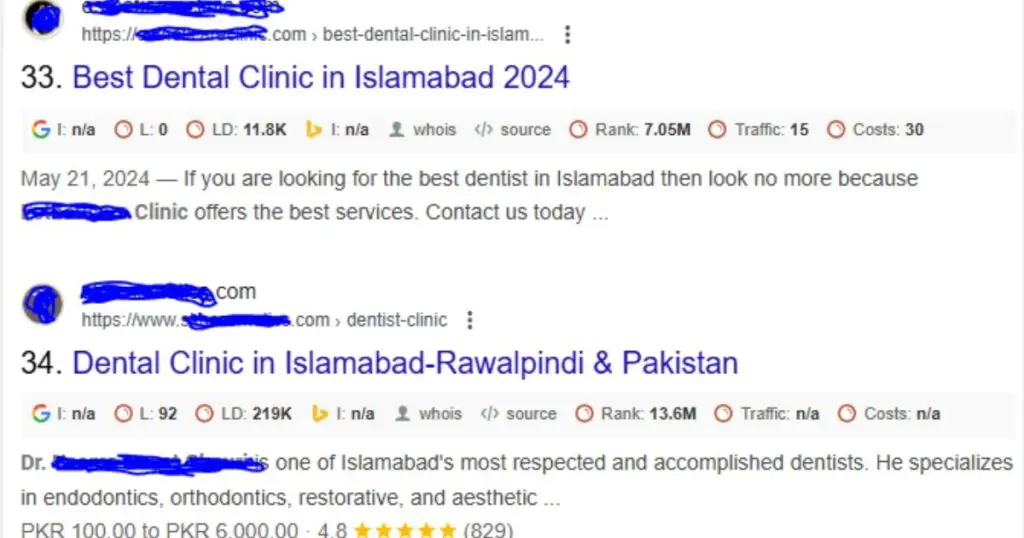
The Local SEO Foundation: Why Schema is Not Optional
What is “Local Pack Prominence”?
Before we dive into the code, we must first define the goal: Local Pack Prominence.
For a service business, the search results page (SERP) is dominated by three elements: Paid Ads, Organic Listings, and the Local Pack (or Map Pack). The Local Pack is the map and the list of 3 businesses that appear at the very top of Google for queries like “plumber near me” or “best dentist in [City Name].” This placement receives a disproportionate share of clicks (Source 2.4, 2.7) and is your primary objective.
Achieving this prominence relies on three core factors: Relevance, Proximity, and Prominence (Source 2.2, 2.5). While proximity is geographic and prominence is built by reviews and backlinks, Relevance is where Schema Markup becomes a non-negotiable technical foundation. Schema is how you feed Google explicit, unambiguous data about your services, hours, and location, drastically improving the engine’s ability to match your business to a user’s high-intent local query. Without this semantic clarity, you are invisible.
Schema 1: LocalBusiness – The Core of Local SEO Schema Markup
{
  "@context": "http://schema.org",
  "@type": "LocalBusiness",
  "name": "Rizvi Consulting Services",
  "telephone": "+92-123-456-7890",
  "address": {
    "@type": "PostalAddress",
    "addressLocality": "Islamabad",
    "addressRegion": "ICT"
  }
}
The LocalBusiness type is the bedrock of your local SEO efforts. Think of it as your virtual business card, but one that Google can read, verify, and trust implicitly. This single block of JSON-LD code should be placed prominently on your homepage and any dedicated location pages.
JSON-LD Example Code Breakdown
The primary goal here is consistency—your business name, address, and phone number (NAP) must match perfectly across your Google Business Profile, your website footer, and this schema code. Any discrepancy (NAP inconsistency) is a trust signal killer.
Here is a simplified, yet powerful, template that goes beyond the basics to include highly recommended properties like operating hours and geographic coordinates:
The essential properties within this code include:
- @type: Set this to the most specific business type available (ee.g., Dentist, Attorney, or ProfessionalService—not just the generic LocalBusiness). This instantly boosts relevance.
- name & address: Your exact, canonical business name and full PostalAddress. These are the non-negotiable required properties.
- openingHoursSpecification: This is crucial for rich results! It uses a 24-hour format and two-letter day codes (e.g., Mo-Fr 09:00-17:00) to let Google display your operating hours directly in the SERP, improving the user experience and earning more qualified clicks.
The Geo-Coordinates Advantage
To gain a technical edge, you must include the geo property, which nests the precise latitude and longitude of your business location. While not strictly required, providing these GeoCoordinates (which you can easily find via Google Maps) offers Google the exact geographical data it needs to calculate Proximity and confidently place your business on the map for users searching nearby. The more accurate and explicit the data, the faster you achieve local prominence.
Schema 2: Service – Defining Your Offering for Niche Ranking
/**
 * SCHEMAS NESTING HIERARCHY
 * The Foundation for Local SEO Authority
 */

 ┌──────────────┐
 │ LocalBusiness│ <--- Your Primary Identity (Homepage)
 └──┬───────────┘
    │ makesOffer (or service)
    │
    V
 ┌──────────────┐
 │ Service      │ <--- The Service You Offer (Service Page)
 └──┬───────────┘
    │ review
    │
    V
 ┌────────────────┐
 │ AggregateRating│ <--- The Trust Signal (Star Ratings)
 └────────────────┘
The LocalBusiness schema tells Google who and where you are. The Service schema tells Google what you offer. For a business that primarily sells expertise or labor (like a lawyer, an HVAC contractor, or a marketing consultant), the Service type is non-negotiable for semantic relevance.
If you sell “Roofing Repair,” you want to rank for “Roofing Repair near me,” not just “Construction Business.” The Service schema allows you to be explicitly clear.
Nesting the Service Type within LocalBusiness
The strategic genius of the Service schema comes from nesting it. Instead of creating a separate, standalone code block (which can confuse search engines), you strategically embed the Service entity inside your main LocalBusiness schema block. This technical maneuver tells Google: “This service is offered by this specific local entity.”
You achieve this by using the makesOffer or service property within the main LocalBusiness code:
[Custom image/diagram goes here demonstrating the visual hierarchy of LocalBusiness (Parent) containing Service (Child) through the ‘makesOffer’ property. Alt Text: Diagram showing Service Schema nested within LocalBusiness Schema using the makesOffer property in JSON-LD.]
The most impactful properties for the Service schema include:
- @type: Set to Service.
- name & description: The exact name of the service (e.g., “Emergency Plumbing Call-Out”) and a short, keyword-rich description of what the service entails. This directly targets your long-tail keywords.
- areaServed: Crucial for service-area businesses (SABs)! This property explicitly defines the geographical areas (city, county, or region) where the service is provided, significantly boosting relevance in those targeted zones.
- offers: This nests an Offer type, which can include the price, a specific price range, or a call to action like “Call for Quote.”
The Niche Ranking Advantage
By nesting Service schema, you create a powerful entity relationship that is technically superior to what most competitors do. This explicit declaration of services, coupled with the areaServed property, helps Google recognize your business as the definitive answer for specific, high-value local niche queries. If you have multiple service pages (e.g., a page for “AC Repair” and a page for “Furnace Installation”), each page should have its unique, corresponding Service schema.
Schema 3: AggregateRating – Dominating the SERP with Star Power
You can have the best LocalBusiness and Service schema in the world, but if you’re not displaying star ratings, you are leaving the most powerful Click-Through-Rate (CTR) magnet on the table. The AggregateRating schema is what injects the golden stars and review counts right into your Search Engine Results Page (SERP) snippets.
How to Prevent Google from Penalizing Your Reviews
This is the non-negotiable part. Google aggressively polices review schema abuse. If you violate their Structured Data Guidelines, you risk a Manual Action Penalty that removes all rich snippets from your entire site.
Here are the three immutable rules for AggregateRating on service pages:
- Relevance and Visibility: The average rating, the total number of ratings, and the reviews themselves must be visible to the human user directly on the page where the schema is placed. You cannot mark up hidden data.
- No Self-Serving Reviews (on the company as a whole): For a LocalBusiness or Organization page, Google generally will not show stars for reviews that you collected about your own business.
- The Service Page Fix: The eligible path to star ratings is to place the AggregateRating schema on the specific service page (e.g., your “AC Repair” page) and nest it within the Service entity you already created. This tells Google: “This rating is for the AC Repair service only,” which is a legitimate use case.
The Technical Implementation
Like the other schemas, you will nest the AggregateRating block inside your Service schema (which is nested inside LocalBusiness). It contains three vital properties:
- ratingValue: The average score (e.g., 4.9).
- ratingCount / reviewCount: The total number of unique ratings/reviews (e.g., 154).
- bestRating & worstRating: (Typically 5 and 1, respectively, though often assumed by Google).
By correctly associating the ratings with the specific Service and ensuring the source of the ratings is clearly visible on the page, you gain maximum SERP real estate and establish immediate social proof—without running the risk of a technical penalty.
Schema 4: FAQ – Turning Simple Questions into Rich Snippets
Once Google grants your page an FAQ Rich Snippet, your listing instantly triples in size, pushing competitors down the SERP and providing answers directly to the user. This is an unparalleled opportunity to dominate the “above the fold” real estate and capture clicks from users with specific informational needs.
The FAQPage schema is straightforward: it requires a question property and a corresponding answer property, and both must be visible on the page.
Best Practices for FAQ Content (The 3 Rules)
The technical implementation is simple, but the content strategy is where you, as the SEO Expert, can provide unique value. We must follow three strict rules to ensure Google accepts and displays the FAQ box:
- Rule of Relevance: The questions must be directly relevant to the content on that specific page. On a plumber’s “Water Heater Repair” service page, the FAQ must only discuss water heater questions (e.g., “How long does a water heater last?”). General questions (e.g., “What services do you offer?”) are often rejected.
- Rule of Uniqueness: The question-and-answer must be self-contained. The answer cannot refer the user to another page (e.g., “See our pricing page for details”). The answer must be complete within the snippet.
- Rule of Policy: The schema must not be used for advertising, promotion, or sensitive topics. It is purely for informational Q&A.
Strategic Tip: To capture valuable long-tail traffic, research common questions that are just related to your service. For a lawyer, a question about “Do I need to bring ID to the consultation?” is a low-competition, high-intent query.
[Custom image showing a Google SERP result with an expanded FAQ rich snippet. Alt Text: Example of a website listing in Google with the FAQ Schema expanded below the main link, showing multiple questions and answers.]
By adhering to these rules and strategically targeting questions related to your Service Business niche, you convert standard website copy into a powerful, click-generating element that builds authority and confidence before the user even lands on your page.
Schema 5: The Global Anchor: Organization & WebSite Schemas
While the previous four schemas focused on getting a local business to appear on the map, the Organization and WebSite types are about building global entity authority. Every successful business, whether local or international, is recognized by Google as a unique entity—a concept often overlooked in basic SEO guides.
Linking to Social Profiles (sameAs)
The Organization schema defines your brand’s official name, logo, and primary contact. The most critical property here is sameAs. This property is your direct line to connecting your website to your verified social media profiles (Facebook, LinkedIn, X/Twitter, etc.).
By implementing sameAs, you explicitly tell Google: “The website at theabbasrizvi.com, the Google Business Profile listing, and the X/Twitter profile are all the same entity.” This eliminates digital ambiguity, builds Knowledge Graph presence, and is a cornerstone of E-E-A-T (Experience, Expertise, Authority, Trust).
The WebSite schema, on the other hand, is a simple, required snippet placed on the homepage. Its primary function is to enable the Sitelinks Search Box rich snippet, allowing users to search your site directly from Google’s SERP—a technical sign of authority.
[Custom image/diagram showing the flow: Website $\rightarrow$ Organization Schema $\rightarrow$ sameAs $\rightarrow$ Social Media Profiles. Alt Text: Diagram demonstrating how Organization Schema uses sameAs to link a local business entity to its verified social media profiles.]
For a service business, leveraging both Organization (for the brand trust) and WebSite (for the search function) demonstrates a sophisticated technical foundation that competitors who stop at LocalBusiness simply cannot match. This final step solidifies your brand as a recognized and trusted source of information and service.
Implementation: Testing, Validation, and Deployment
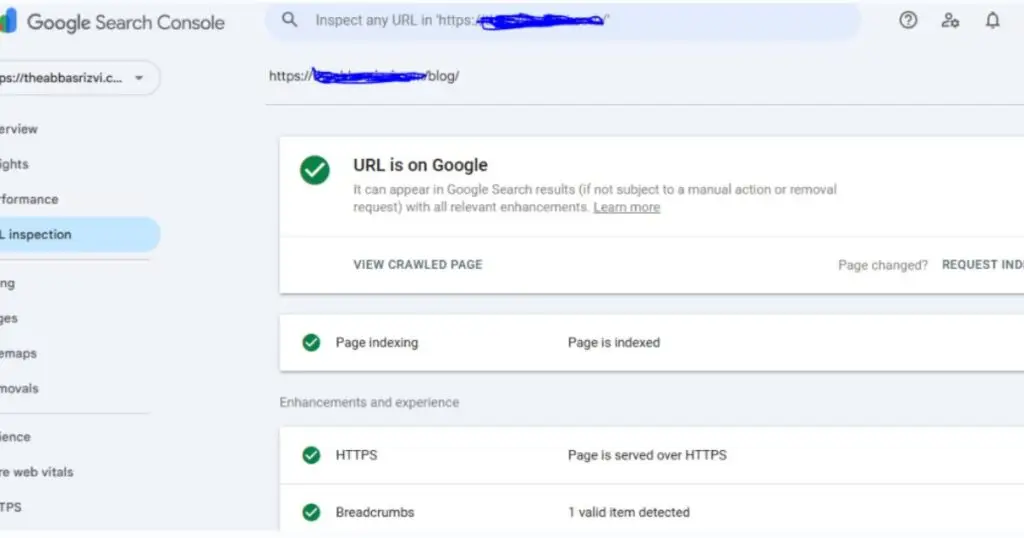
Generating perfect JSON-LD code is only half the battle. The most common reason for schema failure is improper deployment and validation. As your SEO Expert, I stress the importance of a rigorous, three-step technical workflow that ensures Google sees and understands your markup without errors.
The Rich Results Test vs. Schema Validator
Before deploying any code to your live site, you must use Google’s Rich Results Test tool. This tool is paramount because it tells you exactly which rich snippets (like the star ratings or the FAQ box) Google is capable of displaying based on your code. If the code passes this test, you’re 90% of the way there.
However, the Rich Results Test does not check for all technical compliance errors. For deep debugging, you should also use a comprehensive Schema Validator (like the one provided by Schema.org). This second tool ensures your nesting hierarchy is sound and that all required properties are present and correctly formatted, preventing syntactical errors that can silently kill your ranking efforts.
| Schema Type | Recommended Page Placement | Strategic Reason |
|---|---|---|
| LocalBusiness | Homepage & Contact Page | Establishes the core entity identity (NAP, Hours, Geo-Coordinates) site-wide. |
| Organization | Homepage & About Us Page | Builds brand trust (E-E-A-T) and connects the website entity to social profiles (sameAs). |
| WebSite | Homepage (Globally) | Enables the Sitelinks Search Box and defines the site’s search scope for Google. |
| Service (Nested) | Specific Service Pages (e.g., “Plumbing Repair”, “SEO Consulting”) | Crucial for niche ranking by defining the specific service being offered on that page. |
| AggregateRating (Nested) | Service Pages with visible reviews | Dominates SERP with star ratings; must be placed where reviews are visible to avoid penalty. |
Deployment Workflow (Two Safe Methods)
For deployment, you have two reliable options for a service business:
- WordPress Plugin (Easy): Use an advanced SEO plugin (like RankMath or AIOSEO) that has built-in schema generators. This is fast, but offers less control.
- Code Injection (Expert): Use a tool like Google Tag Manager (GTM) or a code snippet plugin to inject the finalized JSON-LD block into the <head> or <body> section of your target pages. This gives you maximum control and keeps the schema separate from your theme or builder code, which is the most robust, technical solution.
The Future of Local Schema: Voice Search and AI
The future of search is not just typing; it’s conversational and generative. As Voice Search and Google’s AI Overviews (or Generative Experience) become dominant, the need for clean, structured data moves from being important to being existential. Your service business must prepare today.
Preparing for Generative AI (The Next Frontier)
Generative AI models do not scan web pages like traditional algorithms; they consume, synthesize, and present information based on a deep understanding of Entities. Since Schema Markup is the most explicit form of entity definition, it is rapidly becoming the essential source for AI Overviews.
When a user asks, “Hey Google, find me a reliable plumber open right now,” the AI must instantly parse three things:
- Entity (Who?): Defined by Organization and LocalBusiness Schema.
- Service (What?): Defined by Service Schema.
- Availability (When?): Defined by the openingHoursSpecification property within the LocalBusiness Schema.
If your Schema is messy, incomplete, or absent, the AI will simply ignore your business and cite a competitor that provides cleaner data. By ensuring every property is complete, you are essentially training the AI to recognize and recommend your service business.
Strategic takeaway: Investing in the five Schemas discussed is not just for old-school SEO; it’s a foundational investment in your brand’s longevity and its ability to participate in the conversational search economy. This level of technical foresight is what distinguishes a struggling website from a true local authority.
Final Thoughts: From Invisible to Local Prominence
You now possess the complete, expert-level technical blueprint for dominating the local search results. The journey from being an invisible local listing to achieving Local Pack Prominence is no longer a mystery; it is a systematic, technical implementation challenge.
We’ve covered the foundational necessity of LocalBusiness, the technical superiority of nesting the Service schema, the crucial risk mitigation of AggregateRating, the SERP-dominating power of FAQ schema, and the long-term entity authority of Organization. By meticulously implementing these five essential schema types, your service business is not only future-proofing against the rise of Generative AI but actively providing Google with the cleanest data available.
This is the ultimate competitive advantage. You have the guide. Now, it is time for execution.
Implementing this technical roadmap—especially the careful nesting and rigorous validation—can be complex and time-consuming. You have the knowledge, but if you need an expert partner to ensure your Schema is deployed flawlessly, without error, and fully optimized for local success:
Comments are closed.